Beyond MS Project

Aidi, the platform built for capital project owners

MS Project schedules tasks. Aidi runs your capital projects end to end: budgets, contracts, schedules, risks and portfolio, in a single system. Built for owners across the public and private sectors.

Book a demoExplore features
verified_user
SOC 2 Type II Certified
arrow_outward
foundation
Purpose-built for capital projects
arrow_outward
flag
Made in Canada
arrow_outward
import_export
Direct MS Project import

MS Project plans tasks. You need to run a portfolio.

MS Project is a strong scheduler. It excels at sequencing tasks, managing dependencies and producing a Gantt chart.

But an owner doesn't just run a schedule. You track budgets and funding sources, manage contracts and payment requests, forecast cash flow, control risk and steer a full portfolio of capital projects. Those responsibilities fall outside a task scheduler, and usually end up scattered across parallel spreadsheets.

Aidi brings it all into one place. The schedule is just one module among many, all connected to the same project data.
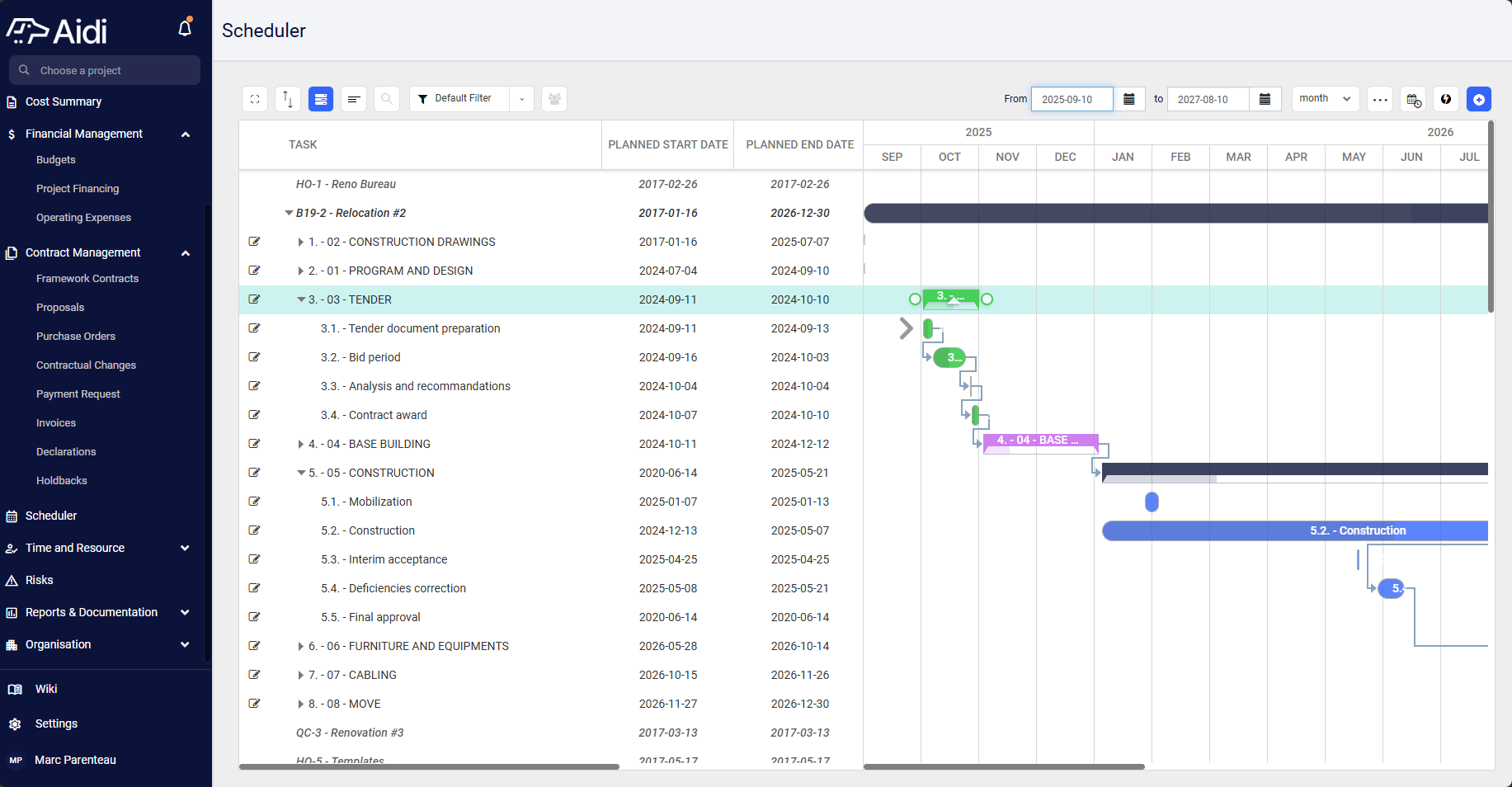
Aidi Scheduler module showing a capital project Gantt chart, with budgets, contracts and portfolio in one platform

MS Project and Aidi for a capital project owner

MS Project and Aidi don't play the same role. Here's where each one fits.

MS Project
Aidi
Scheduling (Gantt, dependencies)
Its strength
Built-in scheduler, with direct MS Project import
Capital project portfolio (budgets, funding)
Not specialized
Purpose-built: portfolios, programs, project intake
Budget and funding tracking
Task-based costs
Budgets, financing, operating expenses
Contract management (contracts, POs, payment requests, holdbacks)
Out of scope
Dedicated module
Cash flow and forecasting
Out of scope
Built in
Owner-side multi-party collaboration
Scheduler-oriented
Built for the owner and stakeholders
Capital project specialization
Generic tool
Specialized end to end
Power BI integration
Possible via export and setup
Native, portfolio dashboards
SmartDoc (document capture)
No
Yes
Expert-led onboarding
Via partners
Included

Moving to Aidi, in practice

hub

No more parallel spreadsheets

Budgets, contracts, schedules and reports live in one platform, connected to the same data (see the sidebar above)
space_dashboard

Your portfolio in real time

The Portfolio module brings together portfolios, programs and project intake so you can decide on current data, with no manual compilation.
document_scanner

Less data entry

SmartDoc captures project documents and feeds Aidi's modules automatically, cutting rekeying and errors.
insights

Decisions backed by data

Native Power BI integration turns your project data into analysis-ready portfolio dashboards.

Why capital project owners choose Aidi

13
+
Years in the industry
5000
+
Projects delivered
$
13
B+
Project value
Trusted by

Security & Compliance

Aidi has successfully completed its SOC 2 Type II audit.‍

Protecting your project and portfolio data is our top priority. This rigorous attestation confirms our ongoing commitment to maintaining the highest industry standards for security, availability, and confidentiality.

Visit our Trust Center
SOC 2 Type 2

A fast, self-serve and supported transition

Switching tools shouldn't freeze your projects. Aidi's scheduler imports your MS Project data directly from the interface: you stay in control of bringing your existing data into the platform.

Around that import, our experts support you: migrating your existing data, an implementation plan, team training and a fast start sequence, designed to deliver value early rather than stretch out an integration project.

Book a demo

FAQ

Doesn't MS Project already do all this?
keyboard_arrow_down

MS Project is a strong task scheduler.

It doesn't cover budget and funding management, contracts, cash flow or steering a portfolio of capital projects.

Aidi covers those in a single system, including the schedule.

Do I have to drop MS Project completely?
keyboard_arrow_down

No. Aidi imports your MS Project data and becomes your control platform. Some teams keep MS Project for occasional detailed planning while centralizing tracking and decisions in Aidi.

Microsoft Project Online is retiring in 2026. Am I affected?
keyboard_arrow_down

Microsoft announced that Project Online (the cloud version) will retire on September 30, 2026.

This does not affect MS Project desktop. If your organization uses Project Online, it's a good time to evaluate a platform built for owners rather than a straight scheduler replacement.

How does migration from Excel or MS Project work?
keyboard_arrow_down

Aidi's scheduler imports your MS Project data directly from the interface. For existing Excel data and for setup, our experts support you: data migration, implementation plan and training.

Is Aidi secure for a public organization?
keyboard_arrow_down

Yes. Aidi is SOC 2 Type II certified. Security and compliance details are published at trust.aidi.io.

A 30-minute demo is enough to see the difference between planning tasks and running a capital project portfolio.